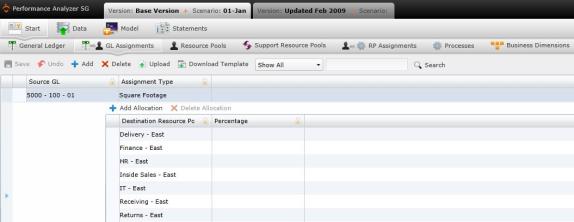
Every general ledger account must be assigned to a resource. Resources are the company's entities that are assigned to general ledger accounts, either because they create the need for the expense, or they are related to the account's payment.
Each resource belongs to a resource pool. Resources pools are a compilation of multiple resources.
Assignments types are defined by three variables: how the cost is allocated (identified on the screen under the "Assignment Type" column), which resource pool is responsible for the cost ("Destination Resource Pool"), and what percentage of the cost is allocated to individual resources ("Percentage").
Example: The East Office is a resource pool that consists of several departments, i.e. resources. Because each of these resources utilize office space, the expense of leasing the building is an item that should be divided among all resources. Because it is space. it is assigned to "Square Footage" and allocated to each resource by the percentage of the space they use.
To review, add, or modify these assignments, select the General Ledger to Resource Pool Assignments panel, which will open the GL Assignments screen.
To modify an existing assignment:
Select the desired Source GL. The screen will open to reveal a current list of source allocations along with their assignment types and allocation percentages.
To add an allocation, select "Add Allocation." A new row will form. Type the name of the resource.
To delete an allocation, highlight the resource and select "Delete Allocation."
Select  to save the changes.
To add a new resource to an existing GL:
Highlight the row of the general ledger.
Select "Add Allocation." A new row will appear.
Type the resource's name in the empty row.
To manually add a new GL assignment:
Select  . A new row will appear.
Under the "Source GL" column, type the name of the GL.
Under the "Assignment Type" column, use the drop-down to choose the type of assignment between the general ledger and the source.
Select "Add Allocation." A new row will appear.
Type the resource's name in the empty row. Repeat steps 4 and 5 until all desired resources have been added to the assignment.
Select to save the changes.
To add assignments using upload:
Select  .
.
The Uploading panel will appear. Drag and drop your files in the grayed area, or select "Browse Upload."
Select to save the changes.
What if the records fail to upload?See Edit Failed Records.
Related Topics:
Introduction to Business Rules
Resource Pool to Resource Pool Assignments